Due to site maintenance, Forum interaction has been disabled until August 13. For support, please search existing forum posts or check the support page.
Integration with BMW Motorrad Connect app

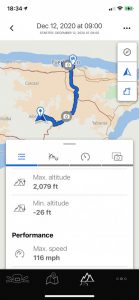
Quote from dasherpr on November 29, 2020, 14:26Hi... it would be great to integrate better with the BMW Motorrad Connected app. I like to use its ride tracking and statistics features, as they include info about the bike (ABS/TC use, lean angle, etc). I have noticed that when I’m using Scenic, the BMW Connected app does not work. Or, strangely, it works sporadically! See attached. Here is my Scenic ride today...and here is what was recorded in the BMW app.
The app still thinks the motorcycle is way south of my home, at 78% fuel, when it’s sitting home with a full tank.
My connection is standard for this - phone and helmet connect to the BMW TFT display, as per the manual instructions. I need the phone to connect like this, for the BMW app to work, but something in the way Scenic works blocks it. Sometimes, as you can see. Whenever I can hear Scenic’s navigation talking to me, that’s when I think the BMW app is not connected. Strange.
Further info: See where my Scenic ride ended? That’s when I reached the highway and saved the ride. I then shut down the iPhone screen, but not Scenic, and rode home. Still the BMW app remained blocked since its own checkered flag on the south coast.
When I do not use Scenic, my BMW app records fine. By the way, the BMW app offers some Rever integration, such as a “save to Rever” feature.
It would be awesome to have some Scenic - BMW Connected integration, or at least no interference.
Vielen dank!

Hi... it would be great to integrate better with the BMW Motorrad Connected app. I like to use its ride tracking and statistics features, as they include info about the bike (ABS/TC use, lean angle, etc). I have noticed that when I’m using Scenic, the BMW Connected app does not work. Or, strangely, it works sporadically! See attached. Here is my Scenic ride today...and here is what was recorded in the BMW app.
The app still thinks the motorcycle is way south of my home, at 78% fuel, when it’s sitting home with a full tank.
My connection is standard for this - phone and helmet connect to the BMW TFT display, as per the manual instructions. I need the phone to connect like this, for the BMW app to work, but something in the way Scenic works blocks it. Sometimes, as you can see. Whenever I can hear Scenic’s navigation talking to me, that’s when I think the BMW app is not connected. Strange.
Further info: See where my Scenic ride ended? That’s when I reached the highway and saved the ride. I then shut down the iPhone screen, but not Scenic, and rode home. Still the BMW app remained blocked since its own checkered flag on the south coast.
When I do not use Scenic, my BMW app records fine. By the way, the BMW app offers some Rever integration, such as a “save to Rever” feature.
It would be awesome to have some Scenic - BMW Connected integration, or at least no interference.
Vielen dank!


Quote from Guido on November 29, 2020, 16:45I don't believe this is a Scenic problem. It's impossible for one app to influence behaviour of other apps. This is a security measure enforced by Apple. I also doubt it is related to the connection with your BMW TFT display. What could be the reason though, is that the BMW Connect app does not have 'always' location access. If that's the case the BMW Connect app will only be able to track location when it's in the foreground.
Further integrating of the two apps... or better yet... have Scenic integrate directly with the BMW TFT display... would require BMW to open up their infrastructure to Scenic.
Something similar is possible though using the WunderLINQ. Have a look here for more info on that: https://scenicapp.space/blog/knowledge-base/wunderlinq-integration/
I don't believe this is a Scenic problem. It's impossible for one app to influence behaviour of other apps. This is a security measure enforced by Apple. I also doubt it is related to the connection with your BMW TFT display. What could be the reason though, is that the BMW Connect app does not have 'always' location access. If that's the case the BMW Connect app will only be able to track location when it's in the foreground.
Further integrating of the two apps... or better yet... have Scenic integrate directly with the BMW TFT display... would require BMW to open up their infrastructure to Scenic.
Something similar is possible though using the WunderLINQ. Have a look here for more info on that: https://scenicapp.space/blog/knowledge-base/wunderlinq-integration/
Quote from dasherpr on November 30, 2020, 04:56Thank you, Guido, for taking the time to give a thoughtful answer.
I checked, and my BMW Connected app is Always On for GPS tracking.
When I’m riding without Scenic, the BMW Connected app has no issues. When Scenic is on, sometimes (not always), the Navigation function on the TFT display (it has a simple turn by turn navigator built in) is grayed out.
My only conclusion was therefore that something in either the iPhone or BMW’s app detects another navigation program using the iPhone and switches off the BMW app tracking. Which is too bad, because of all the nice machine stats I like to see ( such as ABS/TC usage on specific places, lean angles, etc).
Thank you anyway.
Next ride I will try to do this - actively launch the BMW app before launching Scenic, then see what happens.
Thank you, Guido, for taking the time to give a thoughtful answer.
I checked, and my BMW Connected app is Always On for GPS tracking.
When I’m riding without Scenic, the BMW Connected app has no issues. When Scenic is on, sometimes (not always), the Navigation function on the TFT display (it has a simple turn by turn navigator built in) is grayed out.
My only conclusion was therefore that something in either the iPhone or BMW’s app detects another navigation program using the iPhone and switches off the BMW app tracking. Which is too bad, because of all the nice machine stats I like to see ( such as ABS/TC usage on specific places, lean angles, etc).
Thank you anyway.
Next ride I will try to do this - actively launch the BMW app before launching Scenic, then see what happens.

Quote from dasherpr on November 30, 2020, 04:58Thank you for the LINQ suggestion. I have been looking at this. Quick question - does it only work if the bike has a connected cradle? My R1250GS (I call her the cow) came with the cradle enabled... but I removed it, to make space on the crossbar for my iPhone!
Thank you for the LINQ suggestion. I have been looking at this. Quick question - does it only work if the bike has a connected cradle? My R1250GS (I call her the cow) came with the cradle enabled... but I removed it, to make space on the crossbar for my iPhone!
Quote from Guido on November 30, 2020, 05:49Quote from dasherpr on November 30, 2020, 04:56Thank you, Guido, for taking the time to give a thoughtful answer.
I checked, and my BMW Connected app is Always On for GPS tracking.
When I’m riding without Scenic, the BMW Connected app has no issues. When Scenic is on, sometimes (not always), the Navigation function on the TFT display (it has a simple turn by turn navigator built in) is grayed out.
My only conclusion was therefore that something in either the iPhone or BMW’s app detects another navigation program using the iPhone and switches off the BMW app tracking. Which is too bad, because of all the nice machine stats I like to see ( such as ABS/TC usage on specific places, lean angles, etc).
Thank you anyway.
Next ride I will try to do this - actively launch the BMW app before launching Scenic, then see what happens.
Ok. This is very strange indeed. It sounds like Scenic is indeed blocking communication between the Connect app and the TFT.
I’m not very familiar with how it works on the BMW. It seems my KTM TFT works similar though. Also have to connect headphones and iPhone to the TFT. Sound is passed through the TFT to the headphones. And I can use the KTM app for navigation (which then is able to make the TFT display some basic nav instructions). I did not try running Scenic and the KTM app simultaneously, but will give that a try.
Have you tried with other navigations apps as well?
Quote from dasherpr on November 30, 2020, 04:56Thank you, Guido, for taking the time to give a thoughtful answer.
I checked, and my BMW Connected app is Always On for GPS tracking.
When I’m riding without Scenic, the BMW Connected app has no issues. When Scenic is on, sometimes (not always), the Navigation function on the TFT display (it has a simple turn by turn navigator built in) is grayed out.
My only conclusion was therefore that something in either the iPhone or BMW’s app detects another navigation program using the iPhone and switches off the BMW app tracking. Which is too bad, because of all the nice machine stats I like to see ( such as ABS/TC usage on specific places, lean angles, etc).
Thank you anyway.
Next ride I will try to do this - actively launch the BMW app before launching Scenic, then see what happens.
Ok. This is very strange indeed. It sounds like Scenic is indeed blocking communication between the Connect app and the TFT.
I’m not very familiar with how it works on the BMW. It seems my KTM TFT works similar though. Also have to connect headphones and iPhone to the TFT. Sound is passed through the TFT to the headphones. And I can use the KTM app for navigation (which then is able to make the TFT display some basic nav instructions). I did not try running Scenic and the KTM app simultaneously, but will give that a try.
Have you tried with other navigations apps as well?
Quote from Guido on November 30, 2020, 05:51Quote from dasherpr on November 30, 2020, 04:58Thank you for the LINQ suggestion. I have been looking at this. Quick question - does it only work if the bike has a connected cradle? My R1250GS (I call her the cow) came with the cradle enabled... but I removed it, to make space on the crossbar for my iPhone!
You would need the cradle yes. The WunderLINQ is a small box that clicks in the place where the nav unit would go. The black box also has a Bluetooth transponder to connect to your phone. So basically this black box translates signals from the nav cradle (including the wheel input) to Bluetooth and sends it to your phone.
Quote from dasherpr on November 30, 2020, 04:58Thank you for the LINQ suggestion. I have been looking at this. Quick question - does it only work if the bike has a connected cradle? My R1250GS (I call her the cow) came with the cradle enabled... but I removed it, to make space on the crossbar for my iPhone!
You would need the cradle yes. The WunderLINQ is a small box that clicks in the place where the nav unit would go. The black box also has a Bluetooth transponder to connect to your phone. So basically this black box translates signals from the nav cradle (including the wheel input) to Bluetooth and sends it to your phone.
Quote from dasherpr on November 30, 2020, 08:59Quote from Guido on November 30, 2020, 05:49Quote from dasherpr on November 30, 2020, 04:56I’m not very familiar with how it works on the BMW. It seems my KTM TFT works similar though. Also have to connect headphones and iPhone to the TFT. Sound is passed through the TFT to the headphones. And I can use the KTM app for navigation (which then is able to make the TFT display some basic nav instructions). I did not try running Scenic and the KTM app simultaneously, but will give that a try.
Have you tried with other navigations apps as well?
Thanks again. Will try another nav app, although I don't like any others, except Google Maps, which only works point to point, anyway. I've tried Rever and given up on it, although they've been good at integrating with others (such as Apple CarPlay, and the BMW Connected app). Will keep you posted.
Quote from Guido on November 30, 2020, 05:49Quote from dasherpr on November 30, 2020, 04:56I’m not very familiar with how it works on the BMW. It seems my KTM TFT works similar though. Also have to connect headphones and iPhone to the TFT. Sound is passed through the TFT to the headphones. And I can use the KTM app for navigation (which then is able to make the TFT display some basic nav instructions). I did not try running Scenic and the KTM app simultaneously, but will give that a try.
Have you tried with other navigations apps as well?
Thanks again. Will try another nav app, although I don't like any others, except Google Maps, which only works point to point, anyway. I've tried Rever and given up on it, although they've been good at integrating with others (such as Apple CarPlay, and the BMW Connected app). Will keep you posted.
Quote from Guido on November 30, 2020, 09:21Yeah. Google Maps will be fine. Jus to see if that also interferes with the BMW app.
Yeah. Google Maps will be fine. Jus to see if that also interferes with the BMW app.
Quote from dasherpr on December 9, 2020, 04:55Hi Guido...
I tried it Sunday. First segment, I rode a Scenic-planned trip. The BMW app once again only tracked a few snips of it. Interesting insight is that the voice navigation instructions from the Scenic app came in and out. When voice is gone, it seems that’s when there’s interference with the BMW app.
On the way back I used Google maps to take me home. Similar situation. The BMW app only tracked me 100% when I stopped and used it to take me home, although Google maps was still giving me instructions so I removed route guidance from the BMW app. No matter, the BMW app tracked me fully.
So there does seem to be interference, but it seems not to be exclusive to Scenic. Am writing the BMW app developers... let’s see what they say. If they answer, I’ll post here.
By the way, I have offline maps downloaded in Scenic, BMW app and Google.
Hi Guido...
I tried it Sunday. First segment, I rode a Scenic-planned trip. The BMW app once again only tracked a few snips of it. Interesting insight is that the voice navigation instructions from the Scenic app came in and out. When voice is gone, it seems that’s when there’s interference with the BMW app.
On the way back I used Google maps to take me home. Similar situation. The BMW app only tracked me 100% when I stopped and used it to take me home, although Google maps was still giving me instructions so I removed route guidance from the BMW app. No matter, the BMW app tracked me fully.
So there does seem to be interference, but it seems not to be exclusive to Scenic. Am writing the BMW app developers... let’s see what they say. If they answer, I’ll post here.
By the way, I have offline maps downloaded in Scenic, BMW app and Google.
Quote from dasherpr on December 18, 2020, 16:45Hello again, Guido, I went on a ride and purposely did NOT use Scenic, or Google maps. I just used the bike as normal. At the end of the ride, I noticed the BMW Connected App had tracked every bit of the ride, perfectly. Conclusion - there does seem to be interference when using Scenic.
Not sure if there's much you can do about this, but I thought I'd report back anyway.
Thank you!
Hello again, Guido, I went on a ride and purposely did NOT use Scenic, or Google maps. I just used the bike as normal. At the end of the ride, I noticed the BMW Connected App had tracked every bit of the ride, perfectly. Conclusion - there does seem to be interference when using Scenic.
Not sure if there's much you can do about this, but I thought I'd report back anyway.
Thank you!