
Due to site maintenance, Forum interaction has been disabled until August 13. For support, please search existing forum posts or check the support page.
Exporting Google my maps to Scenic

Quote from Mauzep on May 14, 2021, 03:21Hello everyone. I am using scenic for years and I can say its a great app for motorcycle navigation. But now I bit confused. Trying to export google my maps route - containing few route layers. First of all - I cant see any stops - all points are "via", next thing - is it possible some how to merge routes from different layers to one single track?
Thanks in advance
Hello everyone. I am using scenic for years and I can say its a great app for motorcycle navigation. But now I bit confused. Trying to export google my maps route - containing few route layers. First of all - I cant see any stops - all points are "via", next thing - is it possible some how to merge routes from different layers to one single track?
Thanks in advance
Quote from PeteRT on May 14, 2021, 04:31You are doing better than me. I have tried before to export Google My Map files which are in KMZ or KML format and neither type import into Scenic for me. I have created a route in just Google maps web page and copied the hyperlink into the Scenic Web App. That works quite well.
Have you successfully imported a route into Scenic ? If you have you can edit the 'via' points into 'Stops' On the edit page tap on the 'More' menu item, and select 'Convert all vias to stops'.
You are doing better than me. I have tried before to export Google My Map files which are in KMZ or KML format and neither type import into Scenic for me. I have created a route in just Google maps web page and copied the hyperlink into the Scenic Web App. That works quite well.
Have you successfully imported a route into Scenic ? If you have you can edit the 'via' points into 'Stops' On the edit page tap on the 'More' menu item, and select 'Convert all vias to stops'.
Quote from Mauzep on May 14, 2021, 04:46Yes, I did. I just downloaded KMZ file and added one into Scenic. And it works fine except one thing - all stops are lost. Unfortunately - manual conversion is not an option as far as route is a bit complex and contains hundreds of bias and many stops.
Yes, I did. I just downloaded KMZ file and added one into Scenic. And it works fine except one thing - all stops are lost. Unfortunately - manual conversion is not an option as far as route is a bit complex and contains hundreds of bias and many stops.
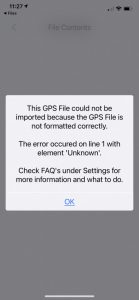
Quote from PeteRT on May 14, 2021, 05:28OK just tried again making sure the downloaded file is a KMZ. On import to Scenic I get the following error message.
OK just tried again making sure the downloaded file is a KMZ. On import to Scenic I get the following error message.
Quote from Mauzep on May 14, 2021, 05:58Actually am OK with both KML&KMZ. As well as with the direct link. But I am doing this from the PC.
Actually am OK with both KML&KMZ. As well as with the direct link. But I am doing this from the PC.
Quote from Mauzep on May 14, 2021, 06:18The worst thing it was not like this before. I am absolutely sure - it was a visibility of waypoints some time ago.
The worst thing it was not like this before. I am absolutely sure - it was a visibility of waypoints some time ago.

Quote from Guido on May 14, 2021, 09:49Quote from PeteRT on May 14, 2021, 05:28OK just tried again making sure the downloaded file is a KMZ. On import to Scenic I get the following error message.
Hi Peter,
KMZ, KML, GDB and ITN files can only be imported through the Scenic WebApp. The iOS app can only import GPX.
Cheers,
Guido
Quote from PeteRT on May 14, 2021, 05:28OK just tried again making sure the downloaded file is a KMZ. On import to Scenic I get the following error message.
Hi Peter,
KMZ, KML, GDB and ITN files can only be imported through the Scenic WebApp. The iOS app can only import GPX.
Cheers,
Guido
Quote from Guido on May 14, 2021, 09:49Quote from Mauzep on May 14, 2021, 06:18The worst thing it was not like this before. I am absolutely sure - it was a visibility of waypoints some time ago.
Have you tried copy/pasting the Google My Maps URL in the WebApp? It can handle Google Maps links, but also Google My Map links. https://scenicapp.space/webapp.php
Quote from Mauzep on May 14, 2021, 06:18The worst thing it was not like this before. I am absolutely sure - it was a visibility of waypoints some time ago.
Have you tried copy/pasting the Google My Maps URL in the WebApp? It can handle Google Maps links, but also Google My Map links. https://scenicapp.space/webapp.php
Quote from Guido on May 14, 2021, 09:52Quote from Mauzep on May 14, 2021, 06:18The worst thing it was not like this before. I am absolutely sure - it was a visibility of waypoints some time ago.
Could you share the My Maps URL here perhaps? Or, if you're not comfortable doing that, email it to me? (There's an 'email me' button all the way at the bottom of the support page.
Quote from Mauzep on May 14, 2021, 06:18The worst thing it was not like this before. I am absolutely sure - it was a visibility of waypoints some time ago.
Could you share the My Maps URL here perhaps? Or, if you're not comfortable doing that, email it to me? (There's an 'email me' button all the way at the bottom of the support page.
Quote from PeteRT on May 14, 2021, 10:22Brilliant. The Google My Maps route KMZ file does indeed work via the Scenic Web App.
Thanks Guido.
Brilliant. The Google My Maps route KMZ file does indeed work via the Scenic Web App.
Thanks Guido.